A practical five-dollar test for connecting Claude to a cryptocurrency wallet
Giving an AI assistant access to financial tools sounds convenient. It also changes the meaning of a simple chat. A request such as “check my balance” may be read-only, while “send five USDC” can create a real blockchain transaction that cannot simply be reversed.
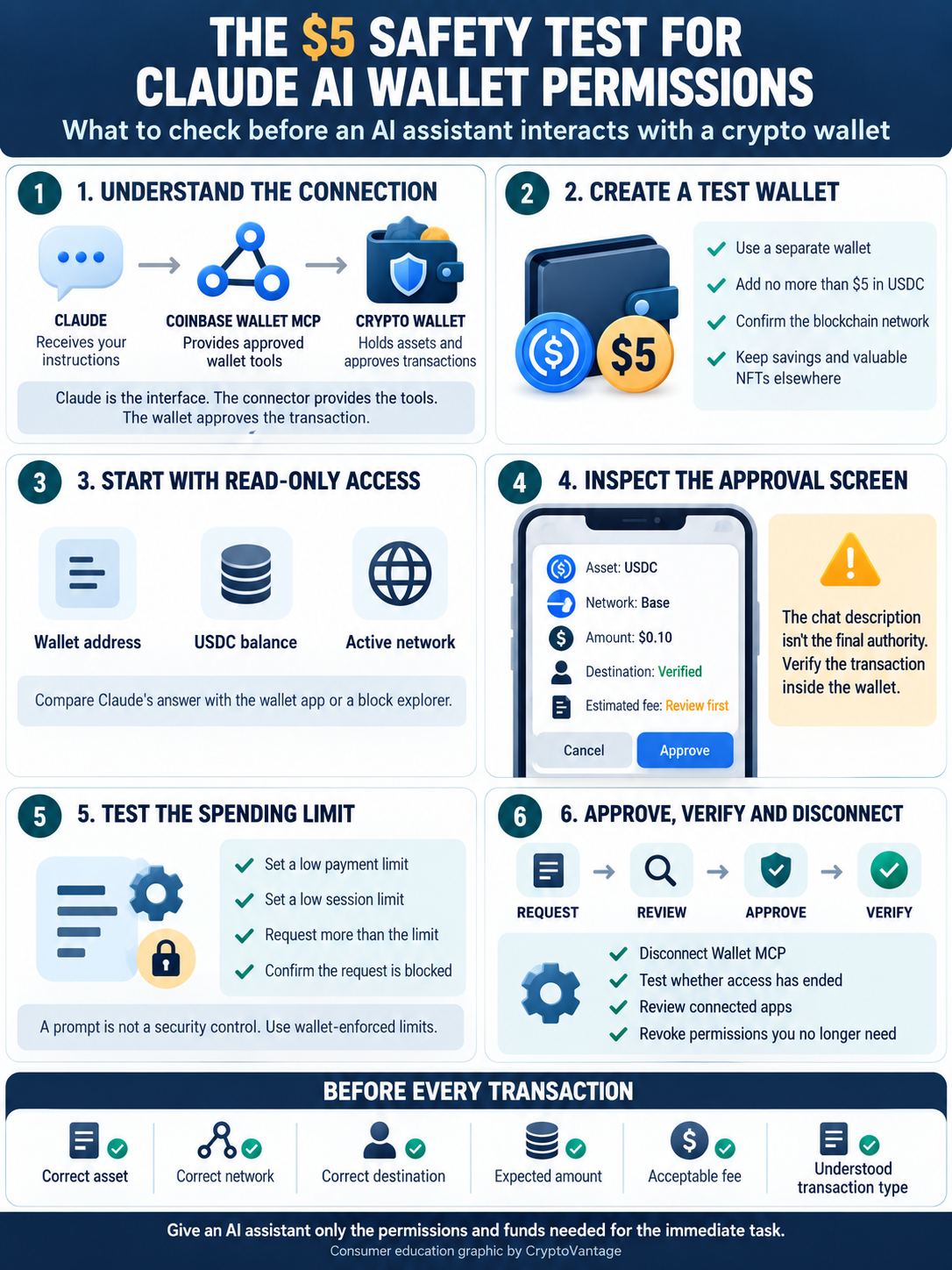
CryptoVantage has published a practical permission test for people experimenting with Claude and a connected cryptocurrency wallet. The basic idea is deliberately modest: use a separate wallet, fund it with no more than $5, examine every permission and approval, and disconnect it when the rehearsal is over.
The guide is not based on the idea that Claude secretly controls a wallet. It does not. Claude is the conversational interface. Wallet access comes from an external connector, such as Coinbase Wallet MCP, that makes specific tools available through the Model Context Protocol. Understanding that separation is the first security lesson.
Claude Is the Interface, Not the Wallet
Model Context Protocol, usually shortened to MCP, is a standard that allows an AI assistant to work with outside tools and data. A calendar connector might let Claude view appointments. A wallet connector can expose balances, payment functions, swaps, signatures or smart-contract calls, depending on the product and the permissions selected.
That distinction matters because the name at the top of the chat window does not tell users where their assets are held. Anthropic operates Claude. Coinbase operates the wallet connector used in this example. The blockchain records completed transactions. Each layer has a different role, and a user should know which company or protocol is responsible before approving anything.

Coinbase says its Wallet MCP works with Claude and can check balances, request transfers, swap tokens, sign messages, execute contract calls and pay compatible x402 services. The company’s documentation also says every write action requires approval in Coinbase Wallet. That approval step is important, but it only helps when the person actually reads what is being approved.
Begin With a Separate Five Dollar Wallet
The safest first experiment is not a wallet containing savings, long-term holdings or valuable NFTs. Create or use a separate test wallet and add no more than $5 in an asset supported by the connector. USDC on Base is a practical example because Coinbase’s agent-payment tools commonly use it, but users must still confirm the asset and network before transferring funds.
This small balance creates a hard limit on the damage caused by a misunderstanding. A spending setting is useful, but a lightly funded wallet adds another boundary. If a connector behaves differently than expected, the exposed amount remains small.
Anyone still deciding how to separate daily-use assets from long-term holdings can review this guide to choosing a secure crypto wallet. The most important choice for this exercise is simple: do not connect the wallet where the majority of your cryptocurrency is stored.
Step One: Check What Claude Can Read
Start with a read-only request. Ask Claude to identify the connected wallet address and show its supported balances. Do not ask it to move anything yet.
Compare the answer with the wallet application or a reputable block explorer. The address, network and balance should agree. This confirms that the connector is reading the intended wallet rather than another account or network.
Notice what else becomes visible. A public blockchain address can reveal far more activity than the balance of one token. Transaction history, transfers and interactions with decentralized applications may all be discoverable from the address. A separate wallet reduces the amount of financial history associated with the AI session.
Step Two: Inspect the Requested Action
Next, ask Claude to prepare a very small action. Depending on the connector, that could be a payment to an x402 service or a request to send a small amount to an address you control.
The wording in the chat is not the final authority. The approval screen is. Check the destination, token, blockchain network, amount and estimated fee inside the wallet before confirming. If the screen presents a contract interaction rather than an ordinary transfer, stop unless you understand what the contract is requesting.
This is where a friendly interface can create false confidence. Claude may summarize an action clearly and still rely on information supplied by the external tool. A compromised or misleading service could return an unexpected destination or transaction. The wallet confirmation exists so the user can independently verify the final request.
Step Three: Test the Spending Boundary
Coinbase offers more than one agent-wallet workflow, and their capabilities should not be treated as identical. Coinbase Wallet MCP can request broader onchain actions, with write actions routed through user approval. Coinbase’s Agentic Wallet MCP is designed around payments to compatible x402 services and allows the user to configure maximum spending per call and per session.
According to Coinbase’s Agentic Wallet MCP documentation, the agent can respect those limits but cannot change them. It also cannot add funds or transfer USDC to an arbitrary address through that restricted toolset.
Set the lowest practical spending limit, then ask Claude to prepare something above it. The request should be blocked or require a new user-controlled decision. Do not increase the limit merely to complete the test. The point is to verify that the boundary works when an instruction conflicts with it.
Step Four: Try a Small Approved Payment
If the read-only check and spending-limit test behave as expected, approve one small transaction. A few cents is enough. Record the quoted price and network fee before proceeding, then compare them with the completed transaction.
Wait for the wallet and blockchain record to show confirmation. Ask Claude for the status, but verify it independently as well. The assistant’s response is useful for convenience; the wallet record or block explorer provides the stronger confirmation.
Parameter has reported on Coinbase tools that let AI assistants interact with wallets and perform onchain tasks. That broader trend makes practical testing more important. As interfaces become easier to use, users may pay less attention to the underlying permission, network or contract call.
Step Five: Revoke Access and Test Again
A permission test is incomplete until access is removed. Disconnect the wallet connector from Claude, review the connected-app settings and remove any session or authorization that is no longer needed.
Then return to a new Claude conversation and request the wallet balance or another tool action. The connector should no longer provide access without a fresh authorization. If Claude can still retrieve wallet information or initiate a request, check whether the connector remains enabled at the account, application or wallet level.
Disconnecting an MCP integration is not necessarily the same as revoking an onchain token allowance. If the test involved a smart contract, inspect active approvals with the wallet’s supported security tools and revoke anything unnecessary. Those are two separate cleanup jobs, even though they may feel like one from inside the chat.
Prompts Are Instructions, Not Security Controls
Telling Claude “never spend more than $5” can help communicate intent, but that sentence is not a substitute for a wallet-enforced limit. Prompts can be misunderstood, overridden by later instructions or influenced by untrusted content supplied to the assistant.
A safer arrangement combines several controls: a separately funded wallet, a low balance, connector-level spending limits, manual approval for write actions and the ability to revoke access. None is perfect by itself. Together, they reduce the chance that one mistaken instruction becomes an expensive transaction.
Users should also be cautious when Claude reads websites, documents or messages while a financial connector is active. Malicious content can contain instructions designed to manipulate an AI agent. Requiring a clear wallet approval and checking the transaction details helps prevent an external text source from quietly becoming a payment instruction.
What to Check Before Approving
Before confirming a Claude-initiated wallet action, verify five details in the wallet itself:
• The asset is the one you intended to use.
• The blockchain network is correct.
• The complete destination address or named recipient is expected.
• The transaction amount and network fee are acceptable.
• The request is a transfer, payment, swap or contract interaction you understand.
If any field is unclear, reject the request and start again. There is little benefit in saving a few seconds if the approval screen cannot be understood. Crypto transactions generally do not include the chargeback protections people associate with credit cards.
A Useful Tool Still Needs Narrow Permissions
Claude can make a wallet easier to operate because natural-language instructions remove some of the friction from balances, payments and other onchain tasks. That convenience is real. So is the risk of approving an action simply because the assistant described it confidently.
CryptoVantage’s five-dollar rehearsal treats an AI wallet connection like any other financial tool: begin with limited funds, test one capability at a time, verify the result outside the chat and remove access when it is no longer required.
The best permission is not the broadest one a connector offers. It is the narrowest permission that completes the intended task, with a human still able to inspect, reject and revoke it.
About the Author
CryptoVantage is a cryptocurrency publication providing educational guides, news, analysis, and reviews covering Bitcoin, blockchain, exchanges, wallets, fintech, and digital assets. Its team of writers, researchers, and cryptocurrency specialists creates accessible content for both newcomers and experienced crypto users, helping readers better understand the rapidly evolving digital-asset industry.
Get 3 Free Stock Ebooks
Discover top-performing stocks in AI, Crypto, and Technology with expert analysis.
- Top 10 AI Stocks - Leading AI companies
- Top 10 Crypto Stocks - Blockchain leaders
- Top 10 Tech Stocks - Tech giants